
Download Windows 8 Upgrade – Windows 8 upgrade, compatibility checker, upgrade assistant, Windows 7 to Windows 8, PC upgrade tool
Overview
The Windows 8 Upgrade application serves as a dedicated utility designed to help users assess whether their current PC meets the system requirements for upgrading to Windows 8. Specifically tailored for users already running Windows 7, the tool streamlines the decision-making process by delivering a quick and reliable compatibility evaluation. Its primary function is to analyze hardware and software configurations to determine if an upgrade is feasible without risking performance issues or hardware incompatibility.
Target users include individuals and small business owners who are considering a transition from Windows 7 to Windows 8 and want to avoid the risks of a failed upgrade. The tool is particularly valuable for users who may lack technical expertise, as it removes the complexity of manually checking system specifications. Real-world use cases include preparing a home computer for a new operating system, ensuring business-critical software remains functional post-upgrade, or planning a system refresh before a major software deployment.
Developed by Microsoft Corporation, the application reflects the company’s long-standing commitment to user-friendly system tools. While the developer did not provide additional technical details about the underlying architecture, the app’s purpose aligns with Microsoft’s broader ecosystem strategy of supporting smooth OS transitions. As a lightweight utility, Windows 8 Upgrade contributes to the broader category of system maintenance tools, offering a focused solution within the utilities segment of the app marketplace.
Key Features & Functionality
- Quick Compatibility Check – The app performs a rapid scan of the system, evaluating hardware components, installed drivers, and existing software to determine if Windows 8 can be installed. The duration of the scan varies based on system load and disk size, but users can expect results within a few minutes.
- Simple User Interface – Designed with accessibility in mind, the interface requires no configuration. Users launch the application and wait for the analysis to complete, making it suitable for non-technical users.
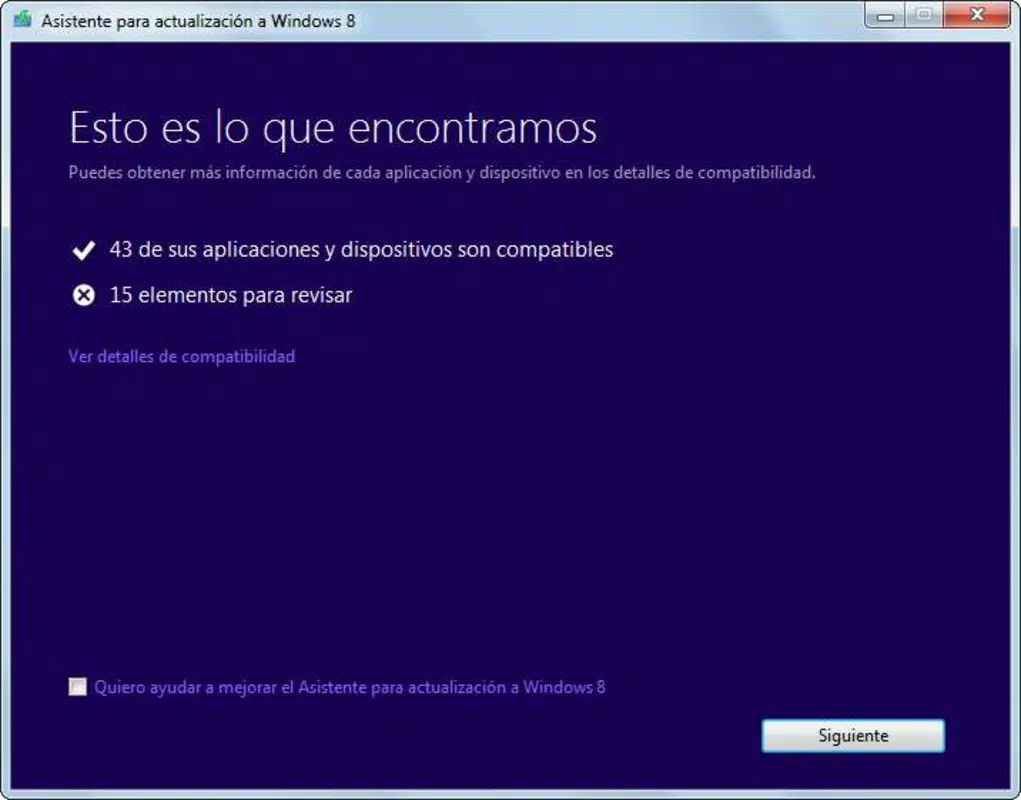
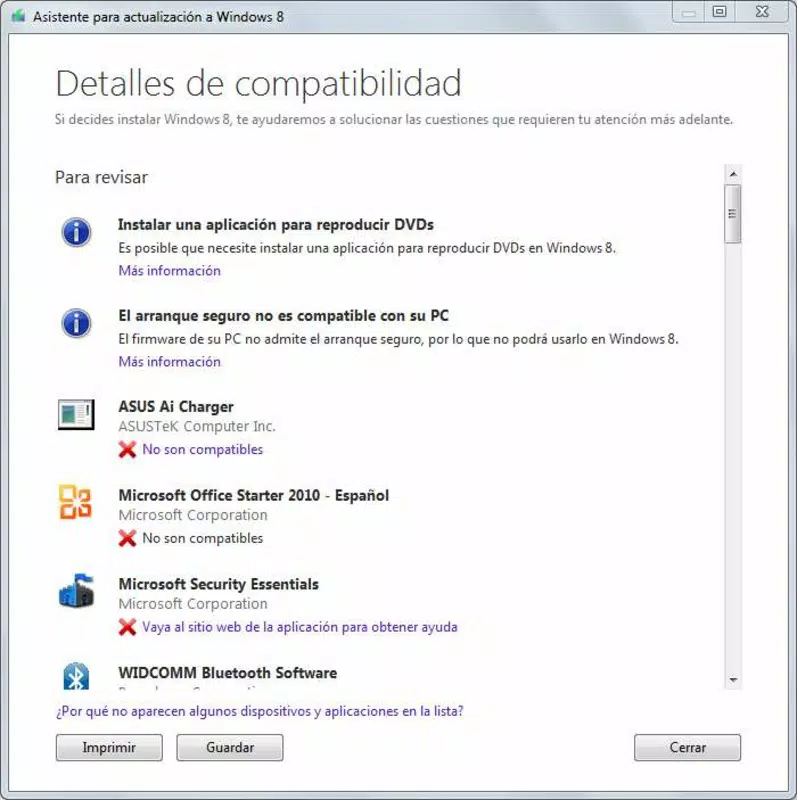
- Detailed Compatibility Report – After scanning, the tool generates a report listing applications and devices that are compatible or incompatible with Windows 8. This allows users to anticipate potential issues and plan for software updates or replacements.
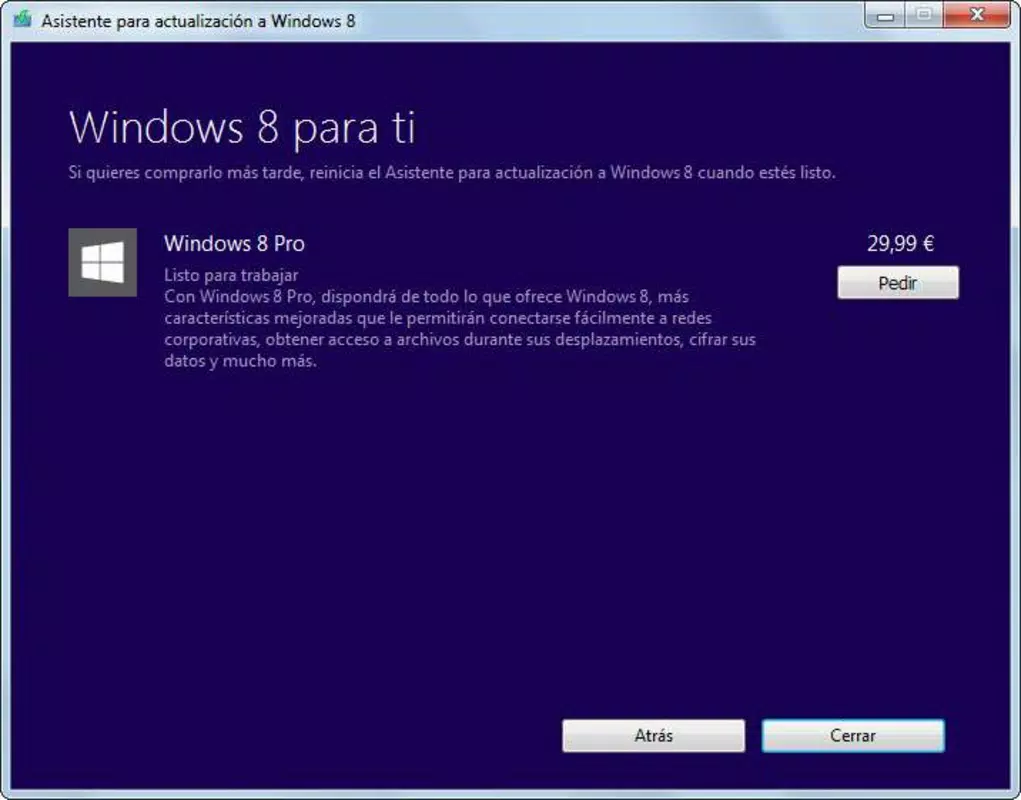
- Seamless Upgrade Process – If the system is deemed compatible, the application provides a direct link to purchase the Windows 8 upgrade, enabling a single-click transition to the purchase page.
- Affordable Upgrade Option – The tool highlights the cost-effective nature of upgrading to Windows 8, which was positioned as a budget-friendly alternative to full OS licenses at the time of release.
For example, a user preparing to upgrade a work laptop can run the tool to identify outdated antivirus software that may not support Windows 8. Similarly, a home user can verify if their printer or scanner will function after the upgrade, avoiding post-installation frustration.
Interface, UX & Performance
The user interface of Windows 8 Upgrade is minimalistic and focused, prioritizing clarity and ease of use. The layout consists of a central progress indicator, a status message, and a final report section. Navigation is linear: launch → scan → view results → proceed to purchase. This straightforward flow reduces cognitive load and ensures users can complete the process without confusion.
Visual design is consistent with Microsoft’s standard desktop application aesthetics, using clean typography and a neutral color scheme. The app does not include unnecessary animations or distractions, reinforcing its utility-focused identity. Responsiveness is adequate for the intended use, with no reported lag during scanning or reporting phases.
Although the developer did not list formal performance metrics, the app’s file size of 2.4 MB suggests a lightweight footprint, minimizing system resource consumption. Stability appears reliable, as the tool operates without requiring additional dependencies or background services. It is suitable for use on a wide range of Windows systems, including older hardware, though specific requirements were not listed.
Platform Compatibility & Technical Requirements
Windows 8 Upgrade is designed for the Windows platform and is compatible with systems running Windows 7 or later. The application requires a minimum of 2.4 MB of storage space, making it highly accessible even on low-capacity devices. The software version is 1.0.0, indicating a stable initial release.
The developer did not specify minimum OS requirements beyond the platform. Compatibility information was not fully disclosed, so users are advised to ensure their system meets the official Windows 8 system requirements before proceeding with an upgrade. No information was provided regarding supported CPU architectures, RAM thresholds, or graphics capabilities.
Pros and Cons
- Lightweight at just 2.4 MB
- Free to download and use
- Simple, intuitive interface
- Provides detailed compatibility reports
- Direct link to purchase Windows 8 upgrade
- Designed specifically for Windows 7 users
- No support for non-Windows platforms
- Compatibility details not fully disclosed
- Does not perform the actual upgrade
- Outdated release date (2012)
- No automatic software update detection
FAQ
Is Windows 8 Upgrade safe to install?
The application is developed by Microsoft Corporation and distributed through official channels. It does not modify system files or install third-party software, making it secure for use on personal and business systems.
Can I use this tool on Windows 8 or Windows 10?
While the tool was designed for Windows 7 users, it may still run on newer Windows versions. However, the developer did not confirm compatibility with systems beyond Windows 7, so results may vary.
Does this app upgrade my operating system?
No. Windows 8 Upgrade only checks compatibility and provides a link to purchase the upgrade. The actual installation must be performed separately through the Microsoft Store or official installation media.
Is the app free to use?
Yes. The application is available at no cost, with no in-app purchases or hidden fees.
How long does the compatibility check take?
The scan duration depends on the system’s hard drive size and registry state. Most users complete the check within a few minutes.
Final Thoughts
Windows 8 Upgrade remains a purpose-built utility that effectively addresses a specific need: determining whether a PC can support a transition to Windows 8. Its lightweight design, free access, and clear reporting make it a valuable tool for users planning an OS upgrade. While the app is now over a decade old and no longer supported, its core functionality continues to serve as a model for compatibility assessment tools.
Individuals running Windows 7 who are considering a system upgrade will benefit most from this tool, especially those without technical experience. The value proposition lies in risk mitigation—avoiding costly upgrade failures by identifying incompatibilities in advance.
Download Windows 8 Upgrade now


